
Summary
-
Platform engineering observability is fundamentally different from application monitoring, requiring visibility across infrastructure, developer experience metrics, and internal platform usage patterns.
-
Implementing golden signals (latency, traffic, errors, saturation) specifically tailored to platform contexts provides early warning systems for potential bottlenecks.
-
Effective platform monitoring requires correlation across disparate components—from CI/CD pipelines to self-service portals—to create a complete observability picture.
-
Organizations that implement comprehensive platform observability see up to 60% reduction in mean time to resolution and 40% improvement in developer productivity.
-
New Relic offers specialized platform engineering observability solutions that integrate with over 780 systems to deliver comprehensive visibility across your entire technical stack.
Traditional monitoring techniques are not enough for modern platform teams. While you've likely mastered application performance metrics, platform engineering requires a completely different observability mindset that spans infrastructure, developer experience, and internal platform adoption. Without this visibility, you're essentially flying blind while supporting critical developer workflows.
The Unseen Expense of Gaps in Your Platform Engineering
Platform engineering groups that lack adequate observability are subject to unseen expenses that accumulate over time. Each unnoticed bottleneck in your CI/CD pipeline, each point of friction in your developer portal, and each overlooked resource constraint all lead to a decrease in engineering speed throughout your entire company. Recent research shows that platform teams lacking in thorough observability spend 35% more time problem-solving and have 3x more escalations to senior engineers.
Why Modern Platforms Outgrow Traditional Monitoring
Application monitoring is primarily focused on the end-user experience and business transactions. While this is important, it fails to meet the unique needs of platform engineering. Your internal developer platform is designed to serve a different audience - your engineering teams. It requires metrics that are reflective of their experience and productivity. Traditional APM tools can tell you when systems are down, but they can't tell you whether your platform is actually facilitating developer productivity or creating bottlenecks.
Using standard tools to monitor internal developer platforms is like trying to comprehend a city's transportation system by only looking at traffic cameras. You can see where traffic is heavy, but you miss the root causes and patterns that could prevent issues before they happen. Platform engineering requires insight into developer workflows, self-service adoption, and automation effectiveness—metrics that are seldom included in traditional monitoring configurations.
Essential Metrics Overlooked by Every Platform Team
While most platform teams monitor basic uptime and resource usage, they often overlook deeper insights that directly affect developer productivity. Are engineers waiting for builds? How long does it really take to provision an environment? Are self-service capabilities being used or ignored? These questions reveal the true state of your platform beyond simple availability metrics.
Overlooking these signals can be costly. A corporate platform team found that their "green" dashboards were hiding the fact that 40% of developers were avoiding their deployment pipeline due to long wait times, resulting in shadow IT practices and security threats. This critical gap between perceived and actual platform adoption was only revealed when they implemented appropriate platform-focused observability.
What Sets Platform Engineering Observability Apart
Platform engineering observability necessitates a multi-faceted strategy that encompasses technical performance, developer experience, and business impact metrics. In contrast to application monitoring, which concentrates on customer-facing features, platform observability must offer insights into the effectiveness of your internal systems in serving your engineering organization. This necessitates visibility into infrastructure provisioning, CI/CD pipelines, security scanning, and developer self-service capabilities.
Platform teams that are most successful are those that make observability a foundational design principle. It's not something they add on later. Instead, they instrument every component of their platform from the very beginning. They continuously refine what they measure, taking into account the changing needs of developers and the goals of the organization. When platform observability is seen as a key ability instead of an added feature, it gives the organization a competitive edge. It speeds up software delivery across the entire organization.
Platform Observability vs. Application Observability: What's the Difference?
Application observability is primarily concerned with the end-user experience, business transactions, and service levels that are customer-facing. On the other hand, platform observability needs to measure the effectiveness of developer tools, internal workflows, and engineering productivity metrics. For example, application observability may monitor the rate of checkout completions, while platform observability monitors the rate of successful builds and the time it takes to provision environments.
Another crucial distinction is who these metrics are intended for. Application dashboards are designed for product managers and business stakeholders, whereas platform dashboards must cater to both platform engineers and the developers who utilize the platform. This dual audience necessitates carefully considered presentation layers that offer both high-level health indicators and detailed troubleshooting capabilities within the same observability solution.
Lastly, platform observability needs to consider extended cause-effect chains. A problem with the deployment pipeline may not have an immediate business impact, but it could slowly decrease developer productivity and ultimately delay the delivery of features. These long-feedback loops necessitate predictive abilities and trend analysis that go beyond simple point-in-time monitoring.
Three Key Elements of Platform Observability
Platform observability is built on three key elements: technical metrics, developer experience indicators, and business impact measurements. Technical metrics encompass infrastructure utilization, deployment frequencies, build times, and automation reliability. These basic measurements ensure your platform is working as expected from a systems point of view.
Developer experience metrics look at how engineers use your platform. This includes how long it takes for new team members to make their first deployment, how often self-service is used, how much the documentation is used, and where there are problems in common workflows. These metrics show whether your platform is really helping engineers or creating new problems. To learn more about how platform engineering compares with other methodologies, explore our platform engineering vs DevOps comparison.
Measuring the impact on the business links the performance of the platform to the results of the organization. This includes improvements in engineering speed, reductions in the average time to recovery, and adherence to compliance. By linking the metrics of the platform to the results of the business, you are showing the strategic value of investing in the platform and guiding future improvements based on the actual impact on the business.
Linking Together Different Aspects of the Platform
The best way to observe your platform is by linking together different metrics. By tying together the slowing of a CI pipeline with the increase in infrastructure costs and the delay in feature delivery, you can turn isolated data points into insights that you can act on. This ability to link together different metrics is what separates basic monitoring from true platform observation.
Key Indicators for Platform Success
To build effective observability, it's important to identify the metrics that are most relevant to the success of your platform. While every platform is different, there are certain key indicators that can provide insight into how well your internal developer platforms are performing. These metrics are able to bridge the gap between technical performance and business outcomes, providing a holistic view of the impact of your platform.
Indicators of Platform Health
Platform health is more than just how long your platform is up and running. It includes a wide range of factors, such as the throughput of your build pipeline, the success rate of environment provisioning, the response times of your APIs, and the utilization of resources across all the components of your platform. These technical metrics are the bedrock of platform observability, as they can help you identify system bottlenecks before they start to affect the productivity of your developers.
A robust platform monitoring strategy keeps an eye on both snapshot metrics and trend data. For example, observing how build times get longer throughout a project can expose a slow decrease in performance that could otherwise slip under the radar. In the same way, monitoring provisioning times across various cloud providers can bring to light inefficiencies in your infrastructure automation that need to be optimized.
Measuring Developer Experience
The effectiveness of a platform can be gauged by the experiences of the developers who use it. Key metrics for assessing developer experience include how long it takes for new team members to successfully deploy for the first time, the rate at which teams adopt self-service, how often manual interventions are necessary, and what proportion of developers are actively using the platform's capabilities instead of finding workarounds.
More sophisticated teams also incorporate direct feedback channels into their platforms. Obtaining real-time developer satisfaction scores following significant interactions offers qualitative data to supplement quantitative metrics. This feedback cycle aids in prioritizing enhancements based on genuine developer problems rather than assumptions.
Internal Platform Service Level Objectives
Formal SLOs for your internal platform provide accountability and set clear expectations. Good platform SLOs usually include availability of the build pipeline (for example, 99.9% availability), maximum acceptable build times (for example, 95% of builds are completed within 10 minutes), and reliability of infrastructure provisioning (for example, a 98% success rate for creating self-service environments).
When it comes to internal platform SLOs, they should be directly related to how they affect developer productivity, as opposed to external services. This means that instead of using a generic metric like "99.5% uptime", you should think about goals like "developers should not have to wait more than 5 minutes for test environments" or "developers should not spend more than 2% of their time waiting on platform services". This way, the SLOs are aligned with the business and provide a more meaningful way to measure how effective the platform is.
Insight into Deployment Pipeline
The deployment pipeline is the heart of your platform, as it delivers the most value. Key visibility metrics to consider include timing breakdowns for each stage, failure rates for every pipeline phase, deployment frequency per team, and rollback percentages. These metrics can help identify bottlenecks or quality issues in your delivery process.
The most useful pipeline metrics link technical measurements to business results. For instance, connecting deployment frequency with feature completion rates shows how pipeline performance affects actual product delivery. Similarly, monitoring the time between code commit and production deployment emphasizes the overall efficiency of your delivery process.
Monitoring Security and Compliance
More and more, platform engineering teams are taking responsibility for automating security and compliance within their delivery pipelines. Key security observability metrics include coverage of vulnerability scans, trends in policy violations, effectiveness of secret detection, and average time to fix security issues. These metrics show how well your platform is maintaining a balance between speed and security requirements.
For compliance observability, you need to keep an eye on both process adherence and audit readiness. The metrics you should be tracking include the percentage of deployments that follow approved processes, the success rates of automated compliance checks, and how complete the audit trails generated by platform tools are. If you set up your platform observability correctly, you can turn compliance from a bottleneck into a competitive advantage by using automation and continuous verification.
Constructing Your Observability Tool Set
Choosing the appropriate tools for platform observability involves juggling thorough coverage with operational ease. The perfect observability set offers insight into your entire platform ecosystem while reducing the burden of sustaining the monitoring system. Tools like New Relic present a consolidated approach that removes the necessity to piece together various monitoring solutions, offering unified insight into infrastructure, applications, and user experience.
A comprehensive platform observability solution should cover a range of areas, from infrastructure metrics to deployment analytics to developer experience tracking. Some teams try to create custom dashboards across separate tools, but this method creates maintenance overhead and correlation problems. An integrated observability platform offers the correlation capabilities necessary for understanding cause-effect relationships across your platform components.
Choosing Between Open Source and Commercial Options
Deciding between open source and commercial options is a crucial part of your observability strategy. Open source tools such as Prometheus, Grafana, and Jaeger provide flexibility and cost benefits for certain monitoring tasks. However, they usually need a lot of integration work to provide a unified view across your platform ecosystem.
Pre-built integrations, unified data models, and streamlined setup experiences are provided by commercial solutions like New Relic, which speed up time-to-value. For platform teams that are already stretched to the limit, these benefits frequently outweigh licensing costs by lowering the engineering effort needed to keep observability systems running. The best strategy for many organizations is to combine carefully chosen open-source components with a commercial observability backbone.
Needs for Integration
For your platform to be effectively observable, you need to be able to integrate it completely across your toolchain. You need to be able to integrate it with your CI/CD systems (like Jenkins, GitHub Actions, and CircleCI), your infrastructure management tools (like Terraform and Kubernetes), your version control systems, and your ticket management platforms. Each integration gives you more context for troubleshooting and optimization.
-
CI/CD integrations should track build times, test coverage, and deployment success rates
-
Infrastructure integrations must provide resource utilization, provisioning times, and cost data
-
Developer portal integrations should capture self-service usage patterns and friction points
-
Ticket system integrations help correlate platform issues with support requests and resolution times
-
Version control integrations connect deployment activities to specific code changes and authors
Data Storage and Retention Strategies
Platform observability generates substantial data volumes that require thoughtful storage and retention policies. High-cardinality metrics and detailed traces are invaluable for troubleshooting but can drive significant storage costs. A tiered retention strategy typically balances these concerns by keeping high-resolution data for shorter periods while preserving aggregated metrics for longer-term trend analysis.
When you're looking at observability solutions, keep in mind their data compression, sampling strategies, and retention flexibility. The best platform lets you have detailed control over retention policies based on data type and importance. This way, you can store data cost-effectively while maintaining essential visibility. New Relic's unified data platform is excellent in this area because it offers flexible retention options without making you manage data across different storage systems.
Putting Golden Signals into Practice on Your Platform
By monitoring latency, traffic, errors, and saturation—known as the Golden Signals—you can establish a reliable basis for platform observability. While these signals were initially developed for service monitoring, they can be surprisingly effective in platform engineering settings when implemented correctly. They can help you identify potential platform problems early on, before they start to affect developer productivity.
Latency: More than Just Response Times
When it comes to platform engineering, latency isn't just about API response times. Key latency measurements include the length of the build pipeline, the time it takes to provision environments, the rate at which security scans are completed, and the speed at which artifacts are published. These metrics show how quickly your platform can meet the needs of developers and help you identify where performance is being held up.
For latency monitoring to be effective, you need to measure percentiles instead of just simple averages. When you track the p95 and p99 build times, you can spot outliers that could suggest there are systemic issues. On the other hand, median (p50) times can show you general performance trends. If you break down latency metrics by team, repository size, and build type, you can find specific opportunities for optimization that might be hidden in aggregate statistics.
How to Understand Usage Patterns on Your Platform
By monitoring traffic metrics, you can gain insight into how developers use your platform as they move through their workflow. Some of the most important traffic indicators are build pipeline invocations, self-service requests, API call volumes, and documentation page views. By examining these usage patterns, you can determine how well your platform is being adopted and identify any platform capabilities that are not being used as much as they could be. These underutilized capabilities may need to be promoted more or improved.
Mistakes: Tracking Both Technological and User Consequences
When it comes to platform situations, mistake tracking must account for both technological breakdowns and the effects on the developer's experience. Technological mistake statistics include build breakdowns, deployment dismissals, infrastructure provisioning breakdowns, and API mistake rates. These metrics emphasize dependability problems within your platform elements.
Errors that impact the developer experience need to be looked at differently. This includes things like how often workflows are abandoned, the number of support tickets that are submitted, when documentation searches fail, and patterns in when self-service options are abandoned. When you combine metrics for technical errors and experience errors, you get a more complete picture of how reliable the platform is. This picture includes both the systems themselves and how users perceive them.
Saturation: Avoiding Resource Shortages
Saturation metrics show how close your platform resources are to reaching their maximum capacity. Key saturation indicators include build agent use, environment capacity limits, artifact storage use, and API rate limit closeness. These metrics help avoid failures related to capacity by identifying resource shortages before they affect developer efficiency.
-
CI/CD agent saturation: Keep an eye on queue depths, wait times, and resource utilization across build agents
-
Environment saturation: Keep tabs on available capacity, provisioning queues, and resource allocation efficiency
-
Storage saturation: Take note of artifact repository growth, cleanup effectiveness, and retention policy impacts
-
Network saturation: Keep track of data transfer volumes, rate limit proximity, and bandwidth utilization
-
Database saturation: Watch query performance, connection pool utilization, and storage consumption
By thoroughly monitoring saturation, you can plan capacity proactively instead of just reacting to problems as they arise. With trending data on resource consumption, you can predict future needs and increase capacity before constraints affect developer productivity. This forward-thinking approach changes platform scaling from a reactive task to a predictable, managed process.
Creating Useful Dashboards for Platform Teams
Useful platform dashboards change raw data into actionable insights. The secret to dashboard success is not showing every possible metric but organizing information based on specific user needs. Different stakeholders need different views - from high-level health indicators to detailed troubleshooting data.
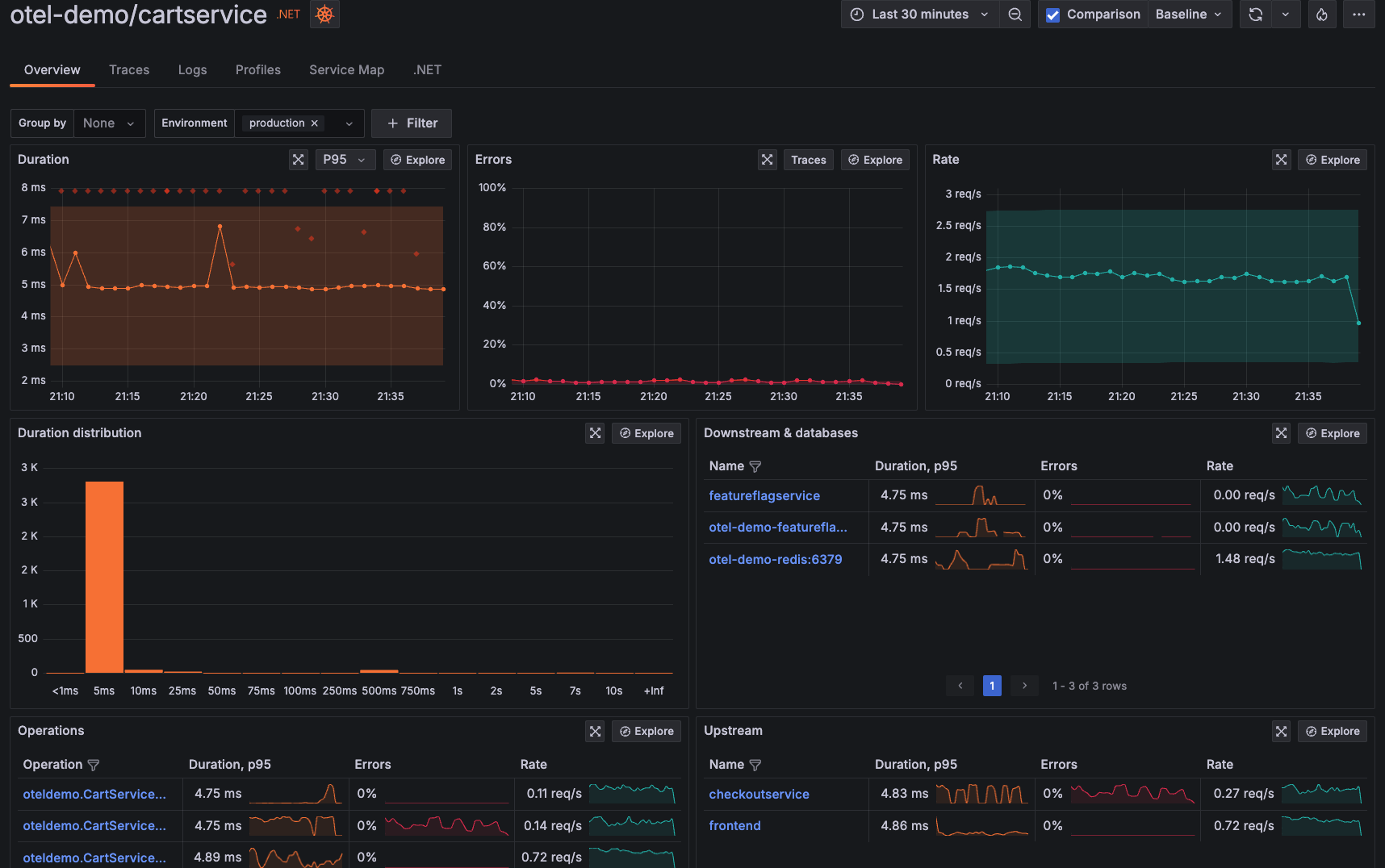
"Application Observability | Grafana Cloud" from grafana.com and used with no modifications.

Management Overview: General Platform Wellness
Management dashboards need to express the value of the platform in a language that the business can understand. Concentrate on metrics that show how your platform boosts the abilities of the organization: more frequent deployments, quicker recovery times, and increased productivity for developers. This view should immediately show if the platform is providing the value it promised, without needing any technical knowledge.
Use data that shows a trend of improvement over time, instead of metrics that only show a single point in time. Executives are more interested in the direction of improvement than the actual numbers. Visual indicators should be easy to understand at a glance, with simple red, yellow, or green indicators supported by significant thresholds based on the impact on the business.
Engineering Perspective: In-Depth Technical Analysis
Teams that work in platform engineering require a thorough technical overview of every component in the platform. These dashboards should display in-depth performance metrics, resource usage trends, and health indicators specific to each component. The engineering perspective allows for both proactive optimization and effective problem-solving when issues occur.
Arrange engineering dashboards according to platform subsystems. These include CI/CD pipeline metrics, infrastructure provisioning statistics, security scanning performance, and developer portal analytics. This arrangement helps engineers quickly concentrate on relevant data during investigations. At the same time, it helps them maintain awareness of the overall health of the platform.
From a Developer's Perspective: Troubleshooting on Your Own
The best platform teams give developers the tools they need for self-service observability. Dashboards that are designed with developers in mind should provide a clear view of the status of each build, deployment, and environment. This view allows developers to troubleshoot common problems without needing to involve the platform team, which improves both the developer's experience and the efficiency of the platform team.
Provide background information that assists developers in comprehending standard performance benchmarks. For instance, displaying the average build times for repositories of a similar size aids developers in deciding whether the length of their current build is abnormal. This background information converts raw data into significant indicators that direct developer actions and expectations.
Designing Alerts to Avoid Alert Fatigue
Alert fatigue is one of the biggest threats to successful platform observability. When teams are overwhelmed with too many notifications or false alarms, they start to disregard alerts altogether—undermining the whole point of monitoring. This issue can be avoided with thoughtful alert design, which includes choosing thresholds wisely, clearly defining ownership, and implementing automated remediation when applicable.
Establishing Significant Limits
Effective warning limits strike a balance between sensitivity and the ability to act. Instead of warning about any deviation from the norm, concentrate on situations that truly require human involvement. Statistical methods such as standard deviation-based limits are frequently more effective than fixed values, as they automatically adjust to your platform's natural performance fluctuations.
Use a multi-stage alerting system that distinguishes between warning conditions and critical failures. Warnings can trigger automated diagnostics or appear in dashboards without immediate notification, while critical alerts require immediate attention through paging or similar high-visibility channels. This tiered approach ensures that high-urgency situations receive the appropriate responses without creating notification overload.
Who's in Charge? Defining Ownership and Escalation
When everyone knows who is responsible for what, it's easier to make sure that the right alerts get to the right people at the right time. By assigning each alert to a specific team or person based on who is responsible for what component and who has the most knowledge in each area, you can avoid the "not my problem" mentality that can slow down the response to an incident when it's not clear who's responsible for what.
Set up a tiered escalation process for ongoing problems. The first alerts might only go to the main team, but if the problem isn't resolved, it should be escalated to more stakeholders based on how long it's been going on and how serious it is. This way, the team is still held accountable, but serious problems get the attention they need if the main responders can't get to it or are too busy.
Automated Solutions for Frequent Problems
Top-tier platform teams have automated solutions for recurring problems. They identify problems that occur regularly and have standard solutions, then they create automation that applies these solutions without needing a person to do anything. Examples of this include automatically adding resources during periods of high usage, restarting processes that have stopped, and removing old cache entries when performance gets worse.
Even if we can't automate everything, we can still automate some things, and that can make a big difference in reducing toil. Automated diagnostics can pull the logs that are likely to be relevant, trace related events, and build a detailed report before a human ever looks at the problem. This prep work can dramatically reduce the time it takes to do an initial investigation, enabling faster resolution even for complex issues.
Advanced Techniques for Observability
As your platform observability practice grows and develops, you'll be able to use more advanced techniques. These techniques will give you a deeper understanding of your platform and let you manage it more proactively. You'll be able to do more than just monitor your platform—you'll be able to predict what's going to happen, see how different systems are connected, and understand how changes to your platform will affect your business.
Implementing Distributed Tracing for Internal Developer Platforms
By using distributed tracing, you can troubleshoot problems across your system by connecting events. This is achieved by implementing trace context propagation throughout your platform components. It provides end-to-end visibility into complex workflows like CI/CD pipelines, environment provisioning, and multi-step developer self-service requests. This comprehensive view allows you to see bottlenecks and dependencies that would otherwise be hidden in isolated metrics.
To get the most out of your platform, make sure that distributed tracing isn't just limited to the technical aspects of your platform. It should also include developer interactions. By tracing everything from the code commit, to review, testing, deployment, and post-deployment verification, you can get a complete view of your software delivery lifecycle. This level of tracing can help you identify where improvements can be made in both your technical systems and your human workflows.
Identifying Anomalies with Machine Learning
Using machine learning for anomaly detection helps to identify odd patterns that could suggest problems are developing before they set off alerts based on thresholds. These systems create baselines for normal behavior across thousands of metrics and then highlight deviations that might not be caught by human observers. For complex platforms with a lot of interconnected components, this automated pattern recognition is crucial for detecting problems early.
Top-notch anomaly detection systems take into account the context instead of just looking at metrics in a vacuum. For instance, a machine learning system might figure out that build times usually go up during certain release cycles or that infrastructure provisioning typically slows down during business hours. This understanding of the context helps cut down on false positives by differentiating between normal variations and real anomalies.
Understanding and Optimizing Costs
Advanced cost observability allows you to see exactly where resources are being used, down to the team, project, and workflow. This level of visibility is essential for accurate chargeback or showback, and it can also highlight areas where you could optimize your resource use. By knowing exactly where platform resources are being used, you can focus your optimization efforts where they will have the most impact and hold teams accountable for using resources efficiently.
By merging cost information with performance data, you can pinpoint opportunities for optimization that offer the most value. Some components that cost more may be worth the investment because they offer crucial performance advantages, while others may not provide much return on investment. This type of value-based analysis can help you avoid situations where trying to save money ends up hurting developer productivity or the reliability of the platform.
Building an Observability Culture
Observability isn't just about the tools; it's about the culture. The best platform teams create a culture that values transparency, makes decisions based on data, and uses observability data to continually improve. This cultural groundwork guarantees that your technical investments result in actual behavioral changes and better results.
Teaching Teams to Utilize Observability Information
Providing thorough training guarantees that platform teams and developers can use observability tools effectively. In addition to basic dashboard navigation, this training should include investigation methods, correlation tactics, and pattern identification skills. The objective is to develop observability fluency—the ability to swiftly extract actionable insights from complex monitoring data.
Practical workshops and real-world examples are better training tools than theoretical documentation. Develop organized activities that guide users through typical troubleshooting situations, slowly adding complexity as users gain confidence. These hands-on experiences create a reflex for efficient observability use during real incidents.
Code-Based Observability Practices
When you treat observability configurations as code, you can ensure consistency, version control, and automation in your monitoring setup. You can define dashboards, alerts, and thresholds in configuration files that are version-controlled. These files can be reviewed, tested, and deployed through the same pipelines as your application code. This method guarantees that observability develops with your platform instead of being maintained separately and as an afterthought.
Feedback Loops for Ongoing Improvement
Good observability forms a basis for ongoing improvement by exposing both issues and opportunities. Set up routine review cycles that look at platform metrics, identify patterns, and prioritize enhancements based on data, not just opinions. These reviews should look at both chances for technical optimization and improvements to the developer experience.
After-incident reviews are a golden opportunity to enhance observability. After every major incident, evaluate not just what went wrong but also whether your monitoring systems provided sufficient visibility. Identify any gaps in observability that delayed detection or made troubleshooting more difficult, then prioritize filling these gaps to improve the response to future incidents.
90-Day Plan to Implement Observability
Implementing a platform observability strategy requires a systematic approach. This 90-day plan offers a practical guide to setting up effective monitoring and providing value at each step. Instead of trying to do everything at once, this step-by-step approach ensures steady progress that won't overwhelm your team.
First 30 Days: Laying the Groundwork and Key Metrics
Start with basic monitoring that includes crucial platform health metrics. Concentrate on implementing the golden signals (latency, traffic, errors, saturation) across your main platform components: CI/CD systems, infrastructure provisioning, and developer self-service tools. This first implementation should include basic dashboards for platform engineers and simple availability metrics visible to developers using the platform.
Days 31-60: Fine-Tuning Alerts and Building Dashboards
Now that you've set up basic monitoring, it's time to fine-tune your alerting strategy to strike a balance between getting the notifications you need and avoiding an overwhelming amount of noise. Make sure to set clear thresholds based on the impact to your business, not just arbitrary technical values. Create dashboards tailored to the needs of platform engineers, developers, and organizational leaders. Emphasize making data actionable by adding context and visualization that highlight patterns, instead of just showing raw numbers.
Days 61-90: Delving Deeper and Team Integration
Expand your observability implementation with more complex features such as distributed tracing, anomaly detection, and cost attribution. Streamline response processes by integrating observability data with incident management workflows. Above all, concentrate on team integration through training, documentation, and cultural reinforcement. The most sophisticated monitoring is worthless if teams don't actually use it for decision-making and problem-solving.
Throughout this process, prioritize small victories that can show stakeholders the value of your work. Early successes can help you build momentum and secure ongoing support for your observability investments. For instance, if you can identify and resolve a significant performance bottleneck in your first 30 days, you'll provide tangible proof of the value of observability and improve the platform experience for all users.
Assessing the Commercial Value of Your Investment in Observability
In order to maintain backing for investments in platform observability, link technical metrics to business results. The real benefit of observability isn't in attractive dashboards but in the enhanced reliability, efficiency, and developer experience it provides. Monitoring these commercial impacts offers a persuasive reason for ongoing investment and helps steer future enhancements in observability.
How Platform Observability Affects Developer Productivity
When you have a good handle on platform observability, you can directly influence how productive your developers are. This is because it can help to reduce the amount of time they spend waiting, prevent any outages, and also make it easier for them to troubleshoot any issues themselves. You can measure this impact by looking at metrics such as the development cycle time, the amount of time spent waiting on platform services, and how often work is blocked due to issues with the platform. These metrics can help you to see the direct link between the performance of the platform and the output of your engineering team, as well as the delivery of business value.
Enhancing Incident Response Time
Thorough observability significantly boosts the metrics of incident response. Monitor the mean time to detection (MTTD), mean time to identification (MTTI), and mean time to resolution (MTTR) prior and subsequent to the incorporation of platform observability. These metrics show how enhanced visibility cuts downtime and lessens the effect when problems unavoidably happen.
Aside from response time metrics, you should also measure the frequency and severity of incidents. Good observability allows you to prevent issues before they happen by identifying problems before they affect users. The decrease in incident frequency is one of the most valuable benefits of mature platform monitoring.
Keeping track of the proportion of incidents that are detected via monitoring as opposed to user reports is crucial when problems arise. As your observability practice progresses, a larger proportion of issues should be identified automatically before users report them. This transition from reactive to proactive detection is an indication of the maturity and efficiency of your monitoring system.
Increasing Platform Usage and Adoption
In the end, the success of a platform is determined by how much developers use it. You should keep an eye on usage trends across all of your platform's features, such as build pipeline usage, self-service requests, and how often the documentation is accessed. If usage is increasing, that means your platform is providing real value to development teams. However, if usage is staying the same or decreasing, that could mean that your platform isn't meeting the needs of developers or that there are issues with the user experience that need to be addressed. For more insights, explore platform engineering observability strategies.
Common Questions
While you're in the process of implementing platform observability, you'll probably run into these questions from your technical teams and organizational leadership. By addressing these concerns ahead of time, you can build support for your observability initiatives and guide effective implementation decisions.
What sets platform observability apart from typical application monitoring?
Platform observability is centered around the tools and processes that facilitate software delivery, as opposed to the software applications that are delivered. While application monitoring is mostly concerned with end-user experience and business transactions, platform observability evaluates the experience of developers, the efficiency of automation, and the facilitation of engineering productivity.
Users of each system help to clarify the difference. Product managers and business stakeholders who are interested in customer experience use application monitoring. On the other hand, platform engineers and developers who are interested in the efficiency of software delivery and the optimization of technical workflows use platform observability.
-
Monitoring applications involves tracking user transactions, load times for pages, and conversions for businesses.
-
Observing platforms involves tracking build times, deployment frequency, and the effectiveness of self-service.
-
Monitoring applications is primarily concerned with the impact on business and implications for revenue.
-
Observing platforms is primarily concerned with productivity for developers and the velocity of engineering.
-
Monitoring applications is optimized for the experience of the end customer.
-
Observing platforms is optimized for the experience of the internal developer.
The most advanced organizations implement both types of observability, creating a comprehensive view from the creation of code through deployment to the impact on the customer. This visibility from end to end enables optimization across the entire value stream, as opposed to creating local optimizations that may not improve overall outcomes.
What are the most common challenges in implementing observability?
The most common challenge in implementing observability on a platform is dealing with data silos. Many teams have difficulty creating a unified view across various tools such as build systems, deployment automation, infrastructure provisioning, and self-service portals. This fragmentation makes it more difficult to correlate data and see cause-effect relationships that span multiple systems.
Another significant hurdle is often cultural resistance. Teams that are used to reactive troubleshooting may initially see comprehensive observability as unnecessary overhead. Likewise, developers may resist instrumentation requirements that seem to add work without immediate benefit. To overcome these objections, it is necessary to demonstrate early wins and ensure that observability truly aids rather than burdens teams.
-
Managing the volume of data and storage costs as metrics scale with platform growth
-
Finding a balance between detail and noise in dashboards and alerting configurations
-
Keeping observability tooling itself as another system that requires maintenance
-
Integrating legacy components with limited instrumentation capabilities
-
Changing metrics as platform capabilities and organizational needs change
Successful implementations address these challenges through incremental approaches, clear prioritization, and strong alignment with business objectives. Rather than trying to achieve perfect observability immediately, focus on high-value use cases that demonstrate clear benefits while building the technical and cultural foundation for expanded capabilities.
How many tools should be in my observability stack?
Even though a complete platform observability needs various capabilities such as metrics, logs, traces, and user experience data, it doesn't mean you need to have multiple tools. The most effective method usually combines a unified observability platform like New Relic with specific integrations for specialized needs. This approach offers correlation capabilities across data types while reducing the operational overhead of managing multiple disconnected systems.
Is it worth it for platform teams to create their own observability tools?
Creating your own observability tools often doesn't pay off when compared to buying a commercial product or using an open-source solution. Building and maintaining a comprehensive monitoring solution can take up a lot of your engineering team's time, which could be better spent on improving your core platform. Instead, focus your customizations on integrating with existing observability platforms, creating specialized visualizations, and automating workflows.
How can I persuade my bosses to spend more on platform observability?
If you want to make a good case for investing in platform observability, you need to show how the technical benefits can lead to measurable improvements for the business. Try to put a figure on how much the current lack of visibility is costing the business in terms of things like delayed product launches, wasted engineering time spent on troubleshooting, and missed delivery deadlines. If you can, use industry benchmarks to show how better observability can give the business a competitive edge in terms of faster delivery, improved reliability, and happier developers.
Begin with concentrated applications that offer quick, noticeable results. For instance, instrumenting your deployment pipeline might quickly reveal bottlenecks that, when addressed, noticeably improve delivery speed. These early successes build credibility and momentum for expanded investments based on demonstrated rather than theoretical value.
Ensure that the leadership team plays a direct role in defining crucial metrics and visualization needs. When the executives have a hand in shaping the requirements for observability, they gain a sense of ownership and understanding that changes their perspective from skepticism to advocacy. This involvement guarantees that your observability implementation will answer the business questions that are of actual concern to the leaders, rather than just addressing technical issues.
Keep in mind that effective platform observability isn't just about technology—it's about making better decisions, solving problems faster, and improving engineering practices across your organization. By implementing comprehensive, thoughtful monitoring of your internal developer platform, you create the visibility foundation that supports continuous improvement in everything from developer productivity to business agility.